Git access over SSH
This guide explains how to clone a PinkSalmon Forgejo or Gitea repository with an SSH key. The public key is registered on the forge; the private key stays on your workstation.
1. Add your SSH key to the forge
If you do not have a key pair yet, follow the guide for your workstation:
Then follow the Add and verify an SSH key on the forge guide.
Add only the public key to your account. Never share your private key.
2. Copy the repository's SSH URL
Open a repository you can access, select SSH cloning and copy the displayed URL.
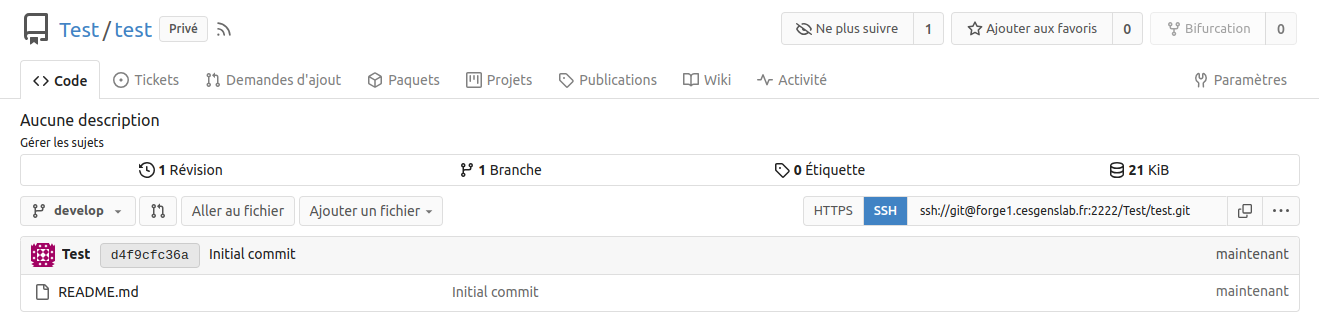
Use the full URL provided by the forge: it includes the server name, SSH user and, if needed, a specific port.
3. Clone the repository
In a terminal, replace REPOSITORY_SSH_URL with the copied URL:
On the first connection, SSH may ask you to confirm the server's identity. Compare the displayed fingerprint with the one provided by your forge administrator before accepting it. The server key is then saved in your known_hosts file.
If your private key is protected by a passphrase, SSH may ask for it. This is the passphrase for your local key.
Once cloning is complete, the code is available in a new directory, usually named after the repository.
Troubleshoot access problems
| Message or problem | Checks |
|---|---|
Permission denied (publickey) |
Check that the correct public key is added to your account and that your SSH client uses the matching private key. |
Host key verification failed |
Check the server fingerprint with your administrator and ensure SSH can save the key in your known_hosts file. |
REMOTE HOST IDENTIFICATION HAS CHANGED |
Have your administrator confirm the key change before updating the server entry in known_hosts. |
| Connection refused or timed out | Check the server and port in the clone URL and their accessibility from your network. |
| Repository not found or access denied | Check the repository URL and the permissions of the account associated with your key. |
The ssh-keyscan command collects server keys without checking their authenticity. It does not replace verifying the fingerprint with your administrator. See the OpenSSH ssh-keyscan documentation for details.
For another connection method, see the HTTPS access guide.